
No-stress summer reading: 10 easy tips to get more from Libby
Lake days and sun-soaked reading afternoons are soon approaching! Summer was always the one time of year when I truly read for fun. This is partly due to having more leisure time, participating in summer reading clubs, and the freedom to read whatever I wanted (The Summer I Turned Pretty, anyone?).
Fast forward a couple of decades and my approach to reading has changed. With so many more options available, I’ve become much more intentional about how I’m choosing my next read. If you’re looking for tips to maximize your time, here are 10 simple ways to make the most of Libby and keep your summer reading stress-free:
1. Plan out your next read (and place holds early).
Is there a specific title you’re interested in reading during summer break? Looking for next month’s pick in your book club? Search in Libby to discover if the title is available at your library. If so, tap the book’s jacket cover to view the title details screen. You’ll be able to borrow, place a hold, or tag, plus see more information like the number of copies available at your library.
If there are existing holds, placing yours early can help your loan arrive right in time for your summer plans.
2. Suspend your hold until vacation or downtime.
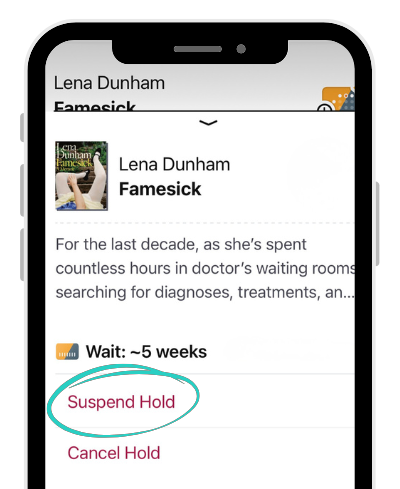 Not ready to borrow a title you’ve placed on hold? No problem. You can suspend your hold and stay at the front of the line to borrow when you’re ready. Holds can sometimes be fulfilled sooner than expected when the library adds more copies or users cancel their hold or return early!
3. Download titles ahead of time so you can read or listen without Wi-Fi.
If you’re heading out of town or know you’ll have spotty Wi-Fi, downloading a title to your device is a great way to be sure you’ll have no interruptions to your reading time. To download a title:
⬇️ Tap the download icon to manually download the title.
✔️ Titles with a checkmark next to them are downloaded to your device.
4. Create a summer reading list.
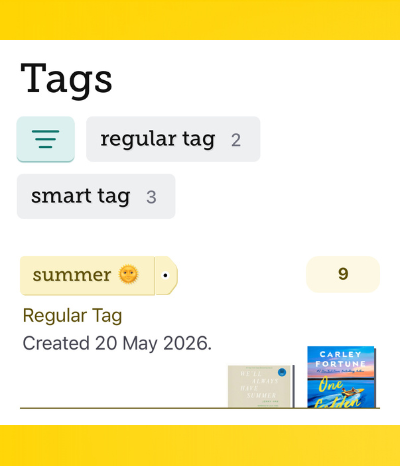 Want to keep track of all the books you want to read? Get creative with tags! Next to each title in Libby, you can tap Save. You’ll then be prompted to save the title to an existing tag or create a new tag such as “Summer Reading.” Use the navigation bar in the footer to find Tags and track your progress throughout the season!
5. Avoid the “summer slide.”
Summer reading programs at your local library begin soon! Get your kids in on the action. Find the next book in their favorite series or put on a family-friendly audiobook in the car. Parents and guardians can also use content controls in Libby to tailor the experience for younger readers.
RELATED READ: Your guide to using the Libby app with kids for summer reading
6. Match your audiobook to your travel time.
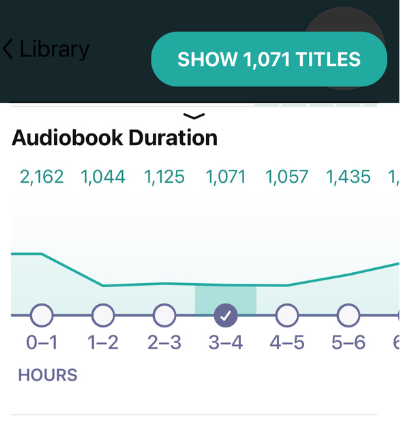 On your way to your destination, try listening to an audiobook! You can filter by audiobook duration to match the length of your trip. I can’t promise there won’t be any more “Are we there yet?” inquiries from your passengers, but hopefully less!
RELATED READ: The best road trip audiobooks to match your travel time
7. Find something to read right now.
Quit waiting for your next read and filter your search by available now to find a ebook, audiobook, or magazine you can borrow instantly. Some libraries even offer skip-the-line titles in Libby, so you can find popular books and read right away!
8. Rethink what counts as reading.
Have you ever heard someone say, “Audiobooks don't count as reading”? It’s a common misunderstanding! Listening to a story is just another way to experience books—right alongside comics, graphic novels, and more. What matters most is finding stories and formats you enjoy.
RELATED READ: The benefits of audiobooks, plus what to listen to next
9. Sample a title before committing.
Try sampling an ebook or audiobook to get a feel for the writing style, narrator, plot, and tone before borrowing. When you read or listen to a sample of a title, Libby saves the title to a smart tag automatically. Go back to your “Sampled” 🍰 titles anytime with tags.
10. Get weekly book recommendations.
Not sure what to read next? Subscribe to Libby Life for a weekly Saturday email with curated reading lists, librarian recommendations, Libby tips like these, quizzes to match you with your next book, and more.
☀️ Your library is ready to support your reading—all summer long. So go ahead and sample that title, download that audiobook, and embrace the joy of summer reading with Libby.
Published May 20, 2026

Emily Astren
Emily Astren works with public libraries in Canada as an account manager. With a passion for storytelling, pop culture, and connection, she can often be found reading, adventuring through the mountains of British Columbia, or spending time with her two cats.