
No more scary shelves! Libby can help you avoid these 5 reading nightmares
While I’m a spooky girl at heart (and in style… and in décor…) there is one place I refuse to invite vampires across the threshold: my TBR list. After a day of exorcising my demons, I need a safe space to retreat to, and that’s Libby.
But what happens when your bookshelf says, “Boo!” and your holds list is haunted?
Here are my top 5 tips for keeping those reading nightmares at bay:
☠️ Tip 1: Slay the endless scroll.
Look, I loooooove choice reading. One of my favorite aspects of Libby is getting to browse more thoroughly than ever before (and in PJs at 2AM), but sometimes having the entire world at your fingertips can feel scary. To slash that urge to scroll until, well, the afterlife, I use filters to find just what I’m looking for in the moment.
Libby filters are a way to find specific titles according to criteria you set. While you browse, you can filter titles by format, subject, sequence, availability, and more—practically any way your little telltale heart desires. Looking for the second audiobook in a witchy YA series? Want a thriller ebook available right now? Libby lets you find specific titles without a terrifyingly long scroll!
🍬 Sweet trick: You can also use pins to automatically apply a filter when searching your library!
☠️ Tip 2: Escape the DNF curse.
I’m “I used to get Netflix DVDs in the mail one at a time” old and the scariest part of that memory is the disappointment of a movie arriving after I was no longer interested in watching it. Now we have instant access to entire catalogs of movies, but the “once bitten, twice shy” part of me still watches a lot of trailers before committing to a movie just to make sure it’s worth my time.
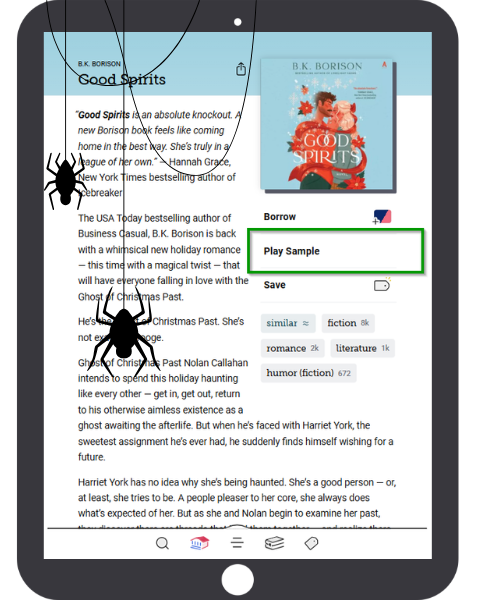 Guess what? You can sample an ebook or audiobook in Libby, too. Here’s how:
1. Select a title cover from your search results. You’ll be taken to the title details page.
2. Select Read Sample (ebooks) or Play Sample (audiobooks).
3. The title will open automatically so you can begin reading or listening.
4. After a few chapters, the rest of the title is locked, and you can no longer read or listen past that spot. You can preview this stopping point from the table of contents.
🍬 Sweet trick: You can find titles’ 'Read Sample' and 'Play Sample' options from within a library’s curated collection, too.
☠️ Tip 3: Don’t let your next read “ghost” you.
“I’m sure I was on the waitlist for the new Rachel Harrison. Why isn’t it in my holds list anymore?”
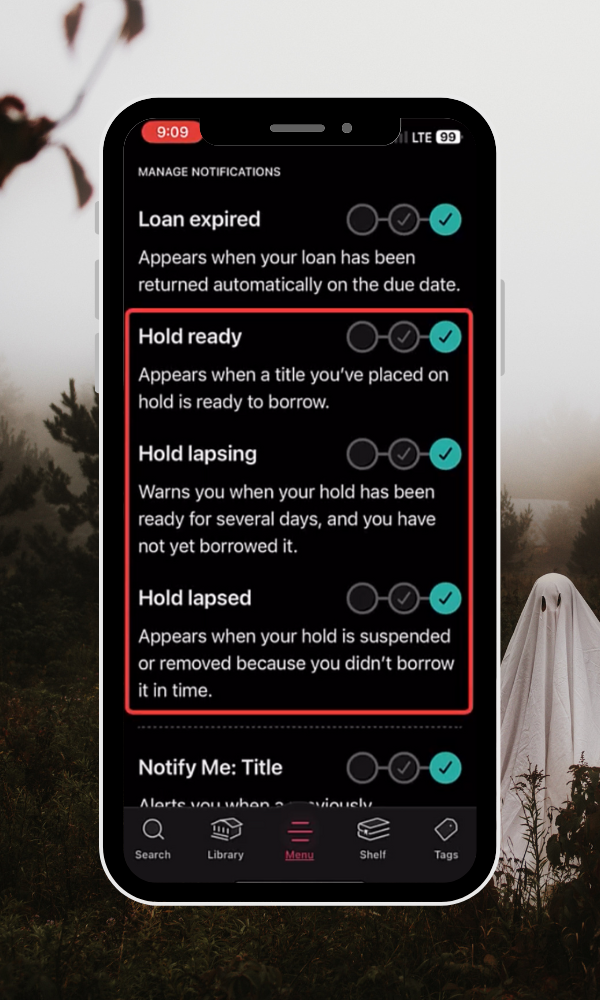 Now THAT would be a scary sentence to utter—nobody wants their holds performing a disappearing act.
I avoid this soul-eating scenario by checking my Libby holds notification preferences and making sure I’m getting my info the way I like. As a Libby obsessive, I prefer to get in-app notifications so I can make decisions about borrowing or suspending my holds on the spot, but you might prefer to get push notifications instead!
🍬 Sweet trick: There’s also an option for managing your notifications by email if you use Libby in your web browser.
☠️ Tip 4: Banish the hold that comes too soon.
Since we’re on the subject of holds, let’s address a real beast of an issue: when all your holds come in at once. Hair-raising, I know.
Honestly, this is where Libby’s super(natural) powers shine. If a waitlisted title comes in and you’re not ready to read it, you can suspend the hold, keeping your place in line until you're ready to read.
Then, once you unsuspend the hold, if you're first on the wait list, you'll get the next available copy of the title!
Libby, you’re an evil genius.
🍬 Sweet trick: If you’re a Libby power user, you may remember that Suspend used to be called Deliver Later.
☠️ Tip 5: Exorcise your TBR demons.
Does your TBR list shriek like a banshee under the weight of your unread books? Do you need Post-Its stuck to you like a terrible Halloween costume from the 80s to remember what you wanted to read next? Use tags to organize your TBR!
The power of tags is more than just adding books to an endless list. You can create and save books to tags however you want—and those naming conventions apply across your libraries.
The possibilities are endless (just like this blog post). For instance, if I wanted to create a “👻Terrifying Tales” or “🎃Spooky Season” tag, I could then peruse every creepy list my libraries post at the start of October and tag, tag, tag to my dark heart’s content.
Then, when I’m ready to dive in, I can sort my tags in a variety of ways—including narrowing the list down to titles available to borrow right away—and cozy up with my horror faves.
🍬 Sweet trick: Yes, you can use emojis in—or as—your tag name! 🦇 🧛🏼♀️ 🐈⬛
I hope this list of Libby tricks (and treats) helps you keep your reading demons at bay.
Happy haunting—er, reading!
Published Oct 22, 2025

Sydney Kalnay
Sydney manages the Libby training team where she uses a spark of magic to transform complex concepts into engaging learning experiences that inspire and empower. After work, Sydney is probably hunkered in a corner writing, hanging out with her cat-familiar, and listening to nothing but Nothing But Thieves.