
Don’t be fooled! Top 10 Libby myths we’re busting
In my mind, a good prank is the ultimate flex. (In good fun, of course.) It takes mastery, wit, and foolproof execution to pull off the perfect trick—and even when you do, there’s still a chance it won’t land. That’s what I love about April Fools’ Day, the Olympics of harmless pranks. And after surviving the winter, a little chuckle to kick off the month of April always feels like perfect timing.
So, in the spirit of one of my favorite holidays, instead of playing tricks, we’re setting the record straight on some of the biggest myths about the Libby app. Only for ebooks? No way. Need Wi-Fi to read? Think again. You may have heard some of this tomfoolery, but don’t fall for it. The truth is here, and that’s no joke!
❌ Myth #1: You lose your place when your loan expires.
✅ Truth: Your progress, bookmarks, and notes stay synced even after your title is returned to the library.
It even applies to your progress in an audiobook. You don’t even have to do a thing. Libby will remember where you left off. I’ve re-borrowed books after years and notice upon opening it that I’m still on page 56 (now... if only Libby could tell me why I didn’t finish it in the first place).
❌ Myth #2: You need Wi-Fi to read.
✅ Truth: Offline reading is supported.
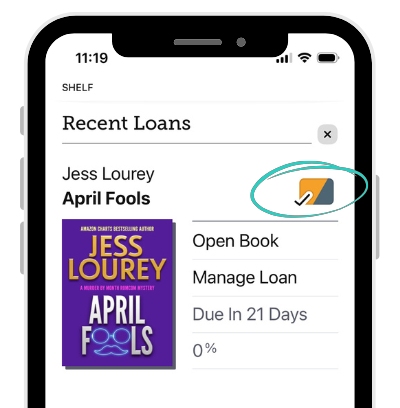 You do need Wi-Fi to download your ebook, audiobook, or magazine to your device first. When you see a checkmark icon next to the title on your Shelf, you know you’re good to go and can read or listen on the airplane, in the car, or wherever you don't have internet access.
You can also choose whether to have them download automatically or not (more on this in Myth #4!).
❌ Myth #3: Libby doesn’t sync across devices.
✅ Truth: It does, instantly.
I like to read on my tablet on the couch, but then I’ll head upstairs to bed. Rather than bringing a bulky tablet, I’ll pick up where I left off on my phone. You can read here, you can read there, you can read everywhere, on any device without losing your place as long as you're connected to the internet.
❌ Myth #4: Audiobooks always take up tons of space on your device.
✅ Truth: You can adjust your download settings to reduce the amount of space Libby uses on your device.
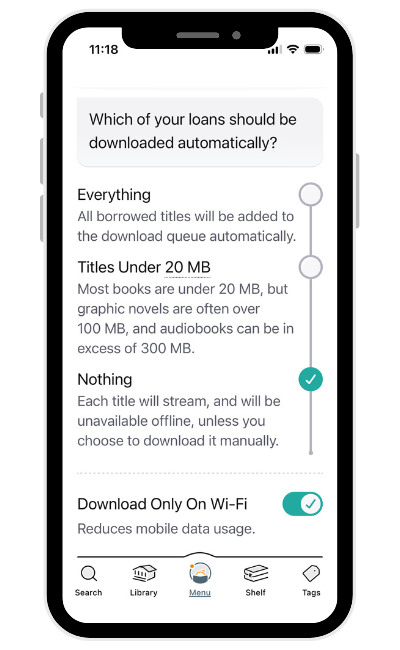 I think it was Burger King that coined the slogan, “Have it your way.” And just like BK, you can also have it your way in Libby. You can manage your download settings to choose whether your loans download automatically after you borrow them, and whether they download when you're not on Wi-Fi. You can also manually delete downloaded titles without returning them.
For more on how to remove downloads and other tips to reduce space, follow this how-to from Libby Help.
❌ Myth #5: Libby is only for reading ebooks.
✅ Truth: Libby is many things: Audiobooks, magazines, comics, graphic novels, and more.
Things you can actually do with Libby:
🗺️ Plan a trip with a travel guide.
🎂 Bake a cake with a cookbook.
🧶 Find a crochet pattern in Craftsy.
💥 Read a comic.
🌐 Learn a language.
💅 Flip through a magazine.
📰 Read unbiased news articles in Ground News.
🗣️ Listen to a story on audiobook.
🏛️ Access legal forms with LawDepot.
🎸 Attend a live concert with Qello Concerts by Stingray.
🍿 Get connected with Kanopy for free streaming TV and movies.
Libby has lots to explore, and every library's offerings are different. You can learn more about a few mentioned above in this post: Explore a little something “Extra” in the Libby app.
❌ Myth #6: You can’t organize your books or TBR in Libby.
✅ Truth: One word: Tags!
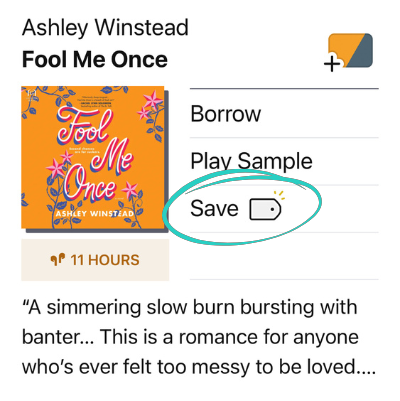 Who can remember all the books they want to read? Not me. I need an easy system for jotting down a book that someone’s telling me about so I actually mean it when I say, “I’ll check it out.” Enter: tags. Tags are a super easy way to organize the books you want to read for later.
Popular ways to use tags include:
- Books you want to read
- Books you're using for a research project
- Favorite books
- Book club reads
- Beach reads
- Audiobooks to listen to on a run or road trip
- Books you want to share with a friend
- Books you’ve read this year
- Magazines to get notified about when new issues come out
Here’s a how to create a new tag in Libby, if you’re not yet familiar.
❌ Myth #7: You have to borrow books whenever they come in.
✅ Truth: You can control the timing of your holds using the “Suspend Holds” feature.
The unscientific truth is: Books can become available at inconvenient times. Just started a new book? Contracted the flu? Busy week ahead? Well hello, hold. The solution is the “Suspend Holds” feature. You can suspend your hold and continue moving up the wait list—and you can do this either before or after the hold is ready to borrow. Then when you’re ready for a new read, recovered from the flu, and the week ahead looks quiet, you can unsuspend the hold. Just don’t wait a whole year—holds will lapse after 365 days.
❌ Myth #8: You need your library card number every time you log in.
✅ Truth: Once you’re signed in, Libby remembers your cards.
I definitely have zero brain space to remember any more passwords, let alone library card numbers. Luckily, reserve your brain space for more books instead! Libby will remember your library card every time you sign in. You may be asked occasionally to verify your card, and you’ll see that prompt under Menu.
❌ Myth #9: You have to wait for magazines.
✅ Truth: Magazines are available to borrow instantly.
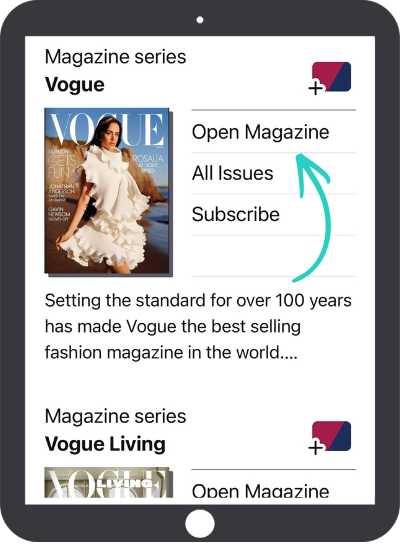 Gone are the days of checking your snail mail for your monthly magazine subscription to arrive. You can borrow past issues of digital magazines in Libby right away with no waiting. Just tap Open Magazine. You can also subscribe to receive a notification when the latest issue is released. No waiting on that, either!
❌ Myth #10: If a book has long wait times, it’s impossible to get sooner.
✅ Truth: People return early all the time and holds often move faster than expected.
Libraries keep a close eye on holds and may purchase additional copies, based on budget and demand. Readers ahead of you in line may also suspend their hold, return early, or choose not to borrow it, moving you up on the waitlist quicker. Hold times in Libby are estimates only and are subject to change. If you have multiple library cards in Libby, it’s worth checking to see if the title has a shorter wait list at another library.
Wondering how long you have to wait? Here’s how you can see your place in line for a hold.
Got a question about Libby and want to uncover the truth? Reach out to our Support team for answers.
Stay informed with the latest app updates and more Libby tricks (the good kind) by subscribing to Libby Life.
RELATED READ: Top 15 most frequently asked questions about the Libby app
Published Mar 24, 2026

Annie Suhy
Annie Suhy is a writer for Libby Life. When she’s not working, practicing yoga, or petting cats, she’s doing paint-by-numbers and buying more plants. An avid poetry fan, her favorite collection is The Splinter Factory by Jeffrey McDaniel. She is an Aries.